Shopify search and filter development

Shopify Search & Filter Development

Improve product discovery with relevant search results, clear collection filters and usable mobile controls. Connect the experience to consistent catalog data and practical merchandising tools.

Selected Shopify work
389+ Shopify projects19,000+ hands-on hours165 written client reviews100% Upwork Job Success
Problems this solves

Help customers find products with confidence.

Shopify search and filter development helps customers move from a broad catalog to products that match their needs. Useful search understands the terms shoppers use; useful filters expose the attributes that matter to their decision.

We review catalog consistency, result relevance and mobile interactions together. The goal is a discovery experience your merchandising team can maintain as products, collections and customer vocabulary change.

Search and filtering depend on product information as much as interface design. We identify how customers describe the catalog, where results fail and which attributes help them decide. The implementation joins that data model to clear search, refinement and recovery interactions.

Who this service is for
Merchants with broad or technical catalogs where customers struggle to find the right product.
Start with the constraint that matters
Bring common search terms, zero-result examples, catalog attributes and the filtering decisions customers make.
Get a project estimate
Choose the right search foundation

Shopify Search & Discovery or a specialist search platform?

Start with representative queries, catalog structure and the controls your team needs. Adding another platform should solve an identified requirement.

Improve native Shopify discovery

Review the existing theme search, collection filters and available Search & Discovery controls first. Product naming, consistent attributes and clear filter labels can address problems that initially look like a search-engine limitation.

Check whether the current theme supports the intended interactions and whether native capabilities fit the catalog. Document the merchant’s responsibilities for maintaining product information and search configuration.

Evaluate a specialist integration

A more complex catalog may need additional relevance controls, merchandising workflows or connections to external product data. Compare those requirements with the supported capabilities and operating costs of potential tools.

Prototype a representative search journey before committing to a platform. Include data synchronization, indexing delays, failure behavior and the process for retiring old search scripts or widgets.

Explore app integrations
Deliverables

A clear search model, interface and merchandising handover.

Search-intent assessment

Compare customer vocabulary with product titles, attributes and current result behavior.

Filter and taxonomy plan

Specify useful filter labels, values and ownership instead of exposing inconsistent internal catalog data.

Discovery interface implementation

Build approved predictive search, result and mobile refinement interactions on the selected search platform.

Relevance and recovery checks

Test representative queries, combinations and empty results, then document merchandising controls for the team.

Decisions before development

Design discovery around the words customers actually use.

A practical planning example

A customer looking for a vehicle cover may begin with a model name rather than a product title. Search and filters need consistent catalog attributes so year, make and model narrow the same product set.

Create a small vehicle-fit dataset with shared model names, different years and a product that fits several vehicles. Decide how partial searches, misspellings and incompatible selections are explained. Review the same customer query through search and filters, including a no-results case. Record who owns fitment corrections so a later catalog import does not reintroduce inconsistent results.

Illustrative scenario for scoping the work, not a reported client result.
Shopify Search and DiscoveryPredictive searchCatalog attributesSearch platform integration
What to decide
Define the attribute vocabulary, missing-data treatment and query synonyms before styling filters. Decide how customers recover from zero results without silently discarding their selections.
What to verify
Test misspellings, ambiguous queries, incompatible filter combinations and browser back navigation. Confirm mobile controls expose the selected filters and a clear reset action.
What to receive at handover
Keep a filter and product-data mapping with the agreed search test cases. Explain which Shopify product fields merchants must maintain, how empty results are handled and how to check new collections before exposing them to shoppers.
From query to product selection

Build a clearer product discovery experience.

Plan the information, controls and recovery states around how customers shop. Each feature should work with realistic catalog content and the chosen search platform.

Predictive search and result relevance

Help customers recognize useful suggestions while typing, then make the full results understandable. Test product names, category language and common query variations. Define how unavailable products and different content types should appear, using the capabilities supported by the chosen implementation.

Collection filters and product attributes

Choose attributes customers can use to narrow a purchase, such as material, size or compatibility. Normalize inconsistent values before exposing them as filters. Define multi-selection behavior, active-filter labels and what happens when combinations produce no matching products.

Mobile filtering and accessible controls

Make filter drawers, sorting and selected values usable on narrow screens. Keep keyboard focus visible, use meaningful labels and make controls easy to operate. Preserve the shopper’s context when filters change or when they return from a product page.

No-results recovery and merchandising

Explain when a query or combination has no matches and offer a clear way to revise it. Avoid presenting unrelated items as exact matches. Document who maintains supported synonyms, product attributes and merchandising rules, and use observed search behavior to prioritize later improvements.

Review the wider buying journey
Help customers narrow the right choice. Diagram labels: Search query, Product filters, Active selection, No-result state.
Implementation checks

From real queries to tested product discovery.

  1. Review real queries

    Use search evidence and catalog examples to define relevance problems.

  2. Build around buying criteria

    Check filter combinations on touch screens and with keyboard input.

  3. Give merchandising control

    Document which synonyms, attributes and result rules the merchant maintains.

Authentic project context

Selected Shopify projects and delivery context.

These examples are selected for relevant Shopify work and visual context. They do not imply a numerical result that has not been verified.

Practical examples and project context

Test discovery with the questions customers actually ask.

The planning scenarios below are illustrative. The linked project provides separately documented storefront context, with its own published scope.

Example: an apparel collection

A shopper wants a navy jacket in a particular size and material. Before designing three filters, check whether the catalog uses consistent color names and whether the data can represent the intended size-selection behavior.

Test combinations with many matches, one match and no matches. Review how selected filters, product availability and clear-all controls appear on mobile, then assign responsibility for keeping new products consistently categorized.

Example: a technical product catalog

A customer searches by model number while product titles use a broader category name. Build a query sample containing exact identifiers, partial terms and common customer descriptions. Check the product attributes and supported search behavior before adding interface complexity.

For compatibility-sensitive purchases, explain what a match means and where the customer should confirm fit. A general search result should not imply verified compatibility without the required data and rules.

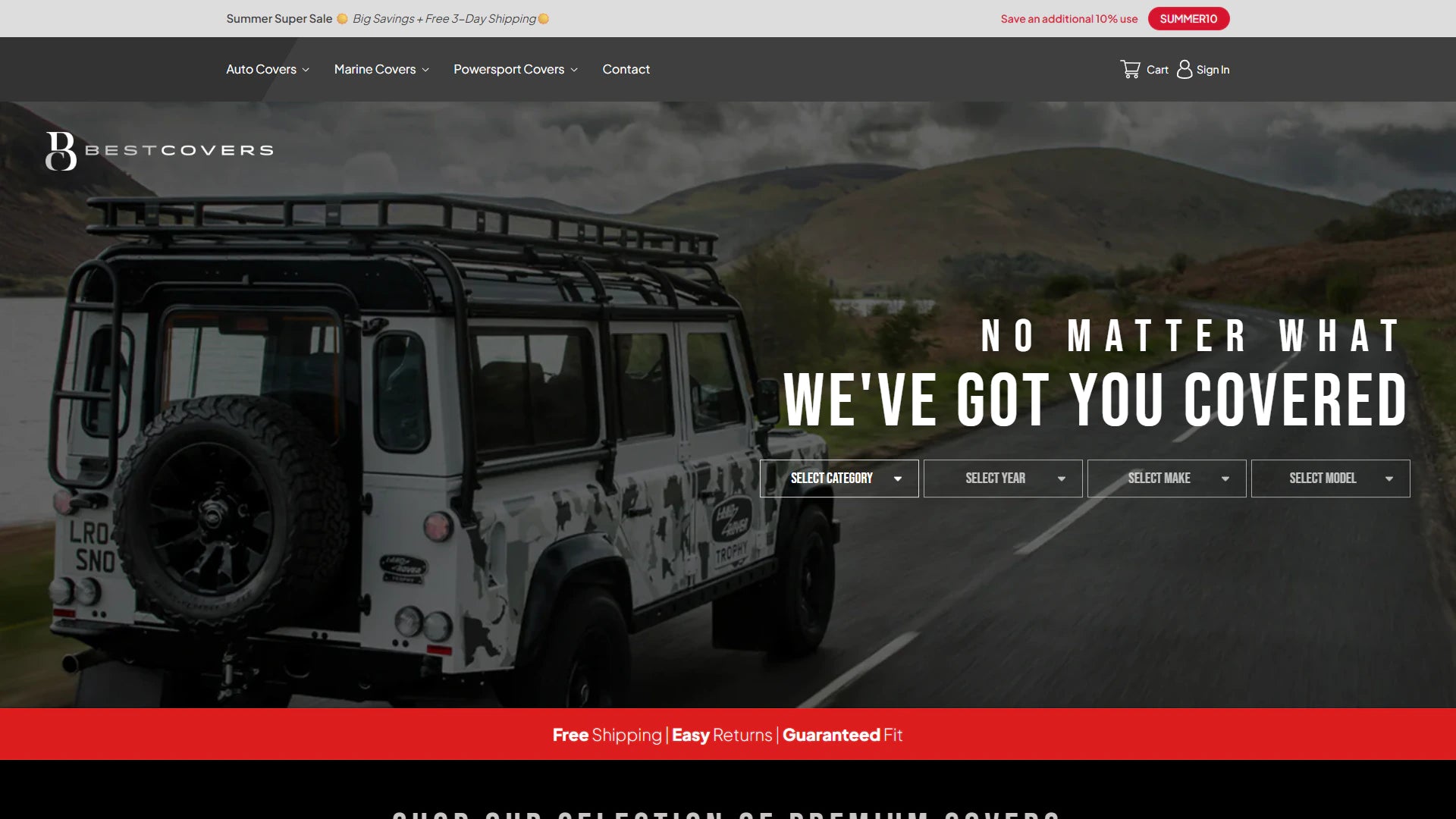
BestCovers: guided product discovery

The BestCovers project documents a vehicle-fit product journey and custom discovery logic for a complex catalog. It provides relevant context for organizing product selection around compatibility rather than expecting shoppers to know the final product title.

Review the published project scope when comparing the requirements of your own catalog.

Read the BestCovers project

Prepare a useful search brief

Share frequent queries, no-result examples, catalog attributes, current tools and the decisions customers struggle with. Include representative products and who can correct the underlying data.

Agree query and filter acceptance checks, loading behavior and merchant handover. Review internal search separately from Google and Bing visibility: improving storefront discovery does not automatically make search-result or filtered URLs suitable for indexing.

Explore technical SEO
Relevant client feedback
“He handled complex first-order SKU logic, prepaid subscription structures, Recharge configuration, and Extensiv fulfillment integration with precision.”

Matterdays / Shopify Partner

Read verified reviews
Engagement models

Use the commercial structure that fits the uncertainty.

  • Fixed scope for defined outcomes
  • Development hours for evolving backlogs
  • Monthly retainers for continuous roadmaps
  • White-label delivery for agency partners
Compare engagement models
Service-specific FAQs

Shopify search and filtering FAQs

Get clarity on scope, cost, ownership and the way we work. Your store, its existing systems and the outcome you need shape the recommendation.

Start with your priorities
Share your Shopify store URL, the main problem to solve, your budget range and any launch date. Include the customer journeys that need attention, the apps you rely on and the tasks your team wants to manage more easily. These details help define a useful development brief.
Know what is included
Your proposal sets out the deliverables, responsibilities, review milestones and commercial terms before development starts. Confirm which theme templates, integrations and content updates are included, along with testing and handover. Shopify subscriptions, paid apps and ongoing support should be identified separately so you can compare the full project cost.
Plan beyond the launch
Agree who owns everyday editing, technical maintenance and future releases. Handover notes explain the delivered controls, outstanding dependencies and the support included in your scope.
Get a project estimate
Do we need a paid search platform?

Not automatically. Shopify Search and Discovery may suit the catalog. Additional software is considered when relevance control, scale or integration requirements justify its operating cost.

Can filtering fix inconsistent product data?

The interface cannot reliably compensate for missing or contradictory attributes. The project identifies data cleanup and ownership before customers depend on those fields to narrow their choices.

How are zero-result searches handled?

The scope can include clearer query feedback, relevant alternatives and navigation back into the catalog. Those rules should follow actual customer language and available products.

Can you improve predictive search?

Yes, subject to the selected platform and theme. We define useful suggestions, result types, keyboard behavior and the transition to full search results using representative customer queries.

Can customers use filters on mobile?

Mobile filter drawers, active selections, sorting and clear-all controls can be included. Testing should cover narrow screens, keyboard operation and returning from a product page without losing context.

Will better storefront search improve Google or Bing rankings?

Internal search and external search visibility are different concerns. Helpful product data and navigation can support the overall site experience, but indexing, canonical URLs and search-engine performance require separate technical SEO review. Rankings are not guaranteed.

How much does search and filter development cost?

The estimate depends on catalog quality, the theme, search platform, integration requirements and interface scope. Share query examples and representative products so data cleanup, development and ongoing software costs can be identified.

Can our merchandising team maintain the results?

We document the supported product attributes, synonyms and merchandising controls included in the project. Handover should identify who updates catalog data and how changes are checked against the agreed query examples.

Your project, led by Vivek

Your next chapter starts with a better store.

Tell us where you want to take your Shopify business. Vivek will review your goals and discuss a practical way forward.

  • Work directly with VivekOne point of contact, from your first message through delivery.
  • Focus on what your store needsA new build, a better customer experience or systems that work together.
  • Know the scope before you commitAgree the priorities, deliverables and cost before work begins.

Paid projects, development hours and ongoing support. Scope and cost are agreed before work starts. Explore working options.

Your next Shopify project

Tell us about your project.

Start with your name, email and a few words about your project. You can add the finer details below.

Add store details, budget or timing (optional)

Vivek reviews your message and replies with scope questions or the next step toward an estimate. Prefer a guided project brief?

Chat with us